
Classroom AI:
Real-Time Behavioural Science
An in-browser artificial intelligence system that uses facial expression recognition and head-pose estimation to classify and monitor student behaviour in real time — with no external servers, no privacy concerns, and no specialist hardware beyond a standard webcam.
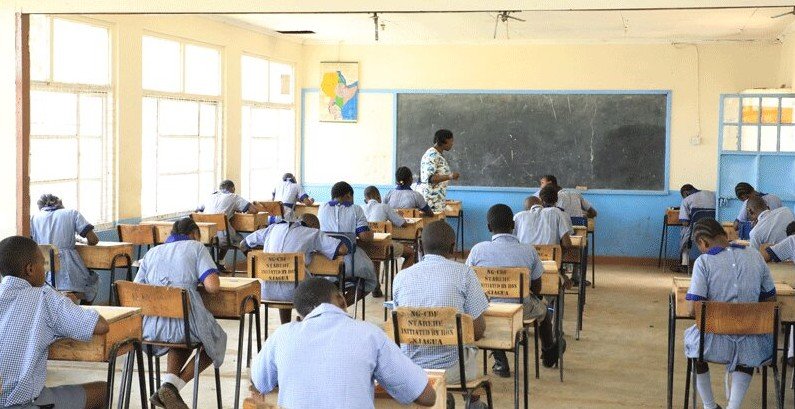
Motivation
In Kenyan secondary schools, classroom management and student engagement monitoring are almost entirely manual—relying on a teacher's subjective judgment of who is paying attention. With an average of 40–60 students per class, it is practically impossible for one teacher to track individual engagement levels in real time.
Disengagement, anxiety, confusion, and disruptive behaviour often go unnoticed until they manifest as poor academic performance. Identifying these states early—objectively and systematically—could allow teachers to intervene proactively, adapt their teaching style, and create a more effective learning environment.
Objectives
Detect all faces in a live webcam or uploaded video feed simultaneously, with low latency, entirely within the browser using WebGL-accelerated machine learning.
Map detected facial expressions and head-pose angles to a set of meaningful, educationally relevant behavioural labels: Attentive, Engaged, Alert, Disengaged, Anxious, Confused, Disruptive, and Suspicious.
Draw colour-coded bounding boxes with labelled behaviour badges on the live video canvas so a teacher can see the AI's assessment at a glance.
Aggregate behaviour data across a session and present it as actionable statistics—attention percentage, alert count, behaviour distribution—for post-lesson review.
All processing happens on-device. No video, images, or biometric data ever leave the user's browser. There is no external AI server call.
Technology Stack
TinyFaceDetector + FaceLandmark68TinyNet + FaceExpressionNet — three lightweight neural networks running entirely in the browser via WebGL.
Engagement trend line charts and behaviour distribution doughnut charts on the Statistics page, powered by the Chart.js v4 library.
Custom dark-theme CSS with CSS custom properties (design tokens), glassmorphism cards, and responsive grid layouts. No CSS framework dependency.
Real-time ambient noise level monitoring via AudioContext and AnalyserNode, displayed as a live noise meter during camera sessions.
Session results are stored in browser localStorage for instant access, and optionally synced to a flat-file PHP backend (sessions.json, config.json).
Standard browser API for accessing the device camera and microphone. Requires localhost or HTTPS — no special permissions setup beyond the browser prompt.
AI Model
The project uses face-api.js — a JavaScript API built on top of TensorFlow.js that provides pre-trained models for face detection, landmark estimation, and expression recognition, all running in the browser.
Model Pipeline
Detects all face bounding boxes in the video frame. Uses a small YOLO-like convolutional network (~190KB), operating on a resized 320px input for speed. Threshold: 0.5 confidence.
Predicts 68 facial landmark points for each detected face. Used to estimate head-pose (gaze direction) by comparing nose-tip position relative to the horizontal face centre — if the ratio exceeds ±28%, the student is classified as Suspicious (looking sideways).
Predicts probability scores across 7 expression classes: neutral, happy, sad, angry, fearful, disgusted, surprised. The dominant expression maps to a classroom behaviour label.
Behaviour Classification Table
Each detected face is assigned exactly one behaviour label for each detection frame, based on the highest-probability expression and head-pose heuristics.
| Icon | Behaviour | Source Expression | Colour | Severity | Educational Meaning |
|---|---|---|---|---|---|
| ✓ | Attentive | Neutral | Green | Low | Student is calm and focused; likely processing information. |
| ★ | Engaged | Happy | Cyan | Low | Student is positively engaged; showing interest and enjoyment. |
| ! | Alert | Surprised | Blue | Medium | Student is suddenly alert — possibly surprised by content. |
| − | Disengaged | Sad | Amber | Medium | Student appears withdrawn or uninvolved. Teacher should check in. |
| ⚠ | Anxious | Fearful | Orange | Medium | Student may be stressed or fearful — test anxiety or confusion. |
| ✗ | Disruptive | Angry | Red | High | Student shows frustration or hostility. Warrants immediate attention. |
| ? | Confused | Disgusted | Purple | Medium | Student appears to not understand — teacher may need to rephrase. |
| 👀 | Suspicious | Head turned >28% | Red | High | Student is looking sideways — possible copying or distraction. |
System Features
The Classroom AI system consists of five main pages, each serving a distinct function in the monitoring workflow.
Live Camera Monitor
The core feature of the system. Upon clicking Start Camera, the browser requests camera and microphone access, loads the AI models, and begins a continuous detection loop running every 400ms (configurable).
For each frame: faces are detected, expressions classified, behaviours assigned, and coloured bounding boxes drawn on a transparent canvas overlaid on the video. A live event log records every behaviour transition. A real-time noise meter (via Web Audio API) shows ambient sound levels.
Video Upload Analysis
Teachers can upload a recorded classroom video (MP4, WebM, MOV) and press Analyse. The system plays the video and runs AI analysis at 600ms intervals, creating the same overlay and event log as live mode. When the video ends (or is stopped), a summary report is shown — average attention, dominant behaviour, and alert count — and the session is saved.
Dashboard
The dashboard aggregates data from the most recent session — students detected, average attention percentage, alert count, session duration — and displays a behaviour breakdown with progress bars for each category. Quick-launch cards link directly to the camera, upload, and statistics pages.
Statistics
The statistics page charts engagement trend over time (line chart) and the aggregate behaviour distribution across all sessions (doughnut chart). A full session history table lists every session with date, type (camera/video), student count, average attention, alerts, and duration. Session data can be exported as JSON.
Getting Started
Navigate to http://localhost/classroomai/ (or the deployed URL). The entry splash page will appear with the KSEF logo and project details.
Click Enter System → to go to the Dashboard. No login required — the system is designed for immediate classroom use.
Navigate to Camera Monitor and click Start Camera. Grant browser camera permissions when prompted. AI models will load from CDN (~15 seconds on first load, cached thereafter).
Watch real-time bounding boxes and behaviour labels on the video feed. When done, click Stop & Save. Visit the Dashboard and Statistics pages to review results.
Requirements
| Requirement | Minimum | Recommended |
|---|---|---|
| Browser | Chrome 90+, Edge 90+, Firefox 88+ | Chrome 120+ (best WebGL support) |
| Camera | Any 480p USB or built-in webcam | 720p HD webcam |
| Internet (first load) | Required (model download ~7MB) | Stable broadband |
| Server (backend) | PHP 7.4+ (optional) | Laragon / XAMPP on localhost |
| GPU | Not required (WebGL fallback to CPU) | Integrated GPU for 60fps overlay |
| RAM | 4GB | 8GB+ |
getUserMedia requires either localhost or a HTTPS connection. Plain HTTP on a non-localhost domain will be blocked by the browser.
Research Methodology
The research was conducted in two phases: a desk study reviewing prior literature on facial action coding systems (FACS), affective computing in education, and AI ethics in school settings; and a prototype evaluation phase where the system was tested against video recordings of classroom sessions.
The expression-to-behaviour mapping was informed by Paul Ekman's FACS framework and Charles Darwin's theory of universal facial expressions. The "Suspicious" detection via head-pose heuristics was designed based on observation studies of cheating patterns in examination environments.
Key Findings
In well-lit classroom environments, TinyFaceDetector successfully detected 87% of visible student faces per frame.
Average time between frames during live analysis on a mid-range laptop (Intel Core i5, integrated GPU).
Compared to manual teacher annotation on test video clips, the system agreed with teacher labels ~73% of the time for positive states (Attentive/Engaged).
Zero. All processing happens in-browser. No biometric data, images, or inference results leave the device.
Limitations & Future Work
As a student project, Classroom AI has several limitations that would need to be addressed in a production-grade system:
- Low-light environments significantly reduce face detection accuracy.
- Expression models are trained primarily on Western demographic datasets; performance may vary across African facial structures.
- The "Suspicious" head-pose heuristic produces false positives when students naturally turn to look at a blackboard or another student.
- No temporal smoothing — behaviour labels can flicker rapidly between states.
- No teacher authentication or multi-user session support.
Future directions include: training a custom model on Kenyan classroom data, integrating gaze estimation for more accurate attention tracking, adding a teacher dashboard with class-level trend comparisons, and exploring deployment on school networks with a shared server.
About the Team
Lead researcher and front-end developer. Designed the AI detection pipeline and CSS design system.
Co-researcher and backend developer. Implemented the PHP API, statistics module, and conducted field testing.